
The secret rulebook behind every tap-and-go payment (Part 3)
Turning the 12 PCI DSS requirements into everyday design, coding, and operating decisions.

Chapter 3: The 12 PCI DSS Requirements Simplified
When most people hear “PCI DSS,” they picture a long list of rules.
And they’re right; there are many of them.
But behind the technical language lies a simple idea:
“Protect payment data through strong design, disciplined operation, and continuous vigilance.”
To make that possible, PCI DSS breaks down into 12 core requirements organised into six logical families.
Think of these as six walls of a fortress protecting cardholder data.
Each wall is made up of smaller bricks, the individual requirements, that together create layered defence.
In this chapter, you’ll walk through each family in plain English.
You’ll learn not just what the control says, but why it exists, and how it plays out in daily architecture and coding decisions.
3.1 The Six Families at a Glance
Build and Maintain a Secure Network and Systems
Set the foundation. Prevent intruders from getting in.Protect Cardholder Data
Shield the information itself, whether stored or transmitted.Maintain a Vulnerability Management Program
Keep your systems patched, hardened, and secure from known flaws.Implement Strong Access Control Measures
Restrict who can touch sensitive systems.Regularly Monitor and Test Networks
Detect what’s happening in real time.Maintain an Information Security Policy
Keep people accountable and trained.
Let’s explore them one by one.
Family 1: Build and Maintain a Secure Network and Systems
Imagine your PCI environment as a castle.
Before worrying about gold inside the vault, you must build the moat and the walls.
That’s what this first family is about; the perimeter.
Requirement 1: Install and Maintain a Firewall Configuration
Firewalls are your gates.
They decide who can talk to what, across which ports, and for what purpose.
In a cloud world, this might mean VPC security groups, routing tables, and API gateway access controls.
Common failure: “Allow all” inbound rules for convenience.
If your security group looks like 0.0.0.0/0, you’ve left your castle doors wide open.
Architect tip:
Document every inbound/outbound rule.
Justify it against business need.
Automate it through IaC (Terraform, CloudFormation) so changes are traceable.
Story:
At one Australian fintech, a misconfigured AWS security group allowed inbound SSH from anywhere. A researcher discovered it, and while no data was taken, the company failed its PCI scan because it couldn’t prove segmentation. The lesson: even potential exposure is non-compliance.
Requirement 2: Do Not Use Vendor Defaults
Many breaches start with laziness, not genius.
Default usernames and passwords; admin/admin, password123, are still shockingly common.
When a new system is deployed, PCI DSS insists that every default credential and configuration be changed before going live.
Developer tip: If your code depends on default admin credentials to connect to a service, fix it now. That’s a red flag.
Architect tip: Bake this into CI/CD. Use configuration scanners (like AWS Config Rules) to detect default credentials automatically.
Mini Reflection:
Think about the last environment you deployed. Were any services launched with default accounts, public endpoints, or “temporary” passwords that were never changed?
Write down one improvement you could make this week.
Family 2: Protect Cardholder Data
Now that your perimeter is guarded, it’s time to protect what’s inside the vault.
Requirement 3: Protect Stored Cardholder Data
This requirement is the backbone of PCI DSS. It says:
“If you store card data, you must render it unreadable.”
That means encryption at rest, using strong algorithms like AES-256 or, better yet, not storing the data at all.
When storage is unavoidable, apply data minimisation: store only what’s strictly necessary. Mask PANs, truncate them (e.g., show only last 4 digits), and protect keys as if they were gold.
Real-world example:
A retailer kept full PANs in a database for “customer convenience.” When their app was breached, attackers stole millions of numbers. If the data had been tokenised or truncated, the impact would’ve been negligible.
Architect lesson: If you can design the system so you never touch real card data, you’ve won half the battle. Outsource vaulting to a certified provider.
Requirement 4: Encrypt Transmission of Cardholder Data Across Open, Public Networks
Data isn’t just vulnerable at rest, it’s also at risk in transit.
Whenever CHD travels over the internet, it must be encrypted using TLS 1.2 or higher.
Common traps:
Using HTTP instead of HTTPS in internal APIs.
Hardcoding endpoints without enforcing HTTPS.
Sending payment payloads through insecure queues or logs.
Developer tip: Always validate certificates and enforce HTTPS redirects in code.
Tester tip: Run scans (e.g., OWASP ZAP, Burp) to ensure no endpoints downgrade connections.
Architect analogy: Think of encryption in transit as putting your data in a secure truck before crossing the border. Never send it in an open ute.
Reflection Pause
If your organisation uses multiple APIs or microservices, do you know which ones handle payment tokens or PANs?
Are all those communications encrypted with TLS, including internal traffic?
Many breaches come from inside networks where teams assume “internal = safe.”
Family 3: Maintain a Vulnerability Management Program
Having secure systems today doesn’t guarantee they’ll be secure tomorrow.
New vulnerabilities appear daily.
This family of requirements keeps your environment resilient through proactive maintenance.
Requirement 5: Protect All Systems Against Malware and Regularly Update Anti-Virus Software
Malware is like termites, quiet, invisible, devastating if ignored.
Requirement 5 ensures that every server, endpoint, or container running PCI workloads is monitored for malicious code.
In modern cloud systems, this means:
Endpoint Detection & Response (EDR) agents
Automated patching
Continuous vulnerability scanning
Developer connection: Even if your app runs in a Docker container, you’re still responsible for the base image. Keep it patched.
Requirement 6: Develop and Maintain Secure Systems and Applications
This is the developer’s rulebook.
PCI DSS doesn’t just ask for security tools, it expects secure behaviour during coding.
Key practices:
Follow secure coding standards (like OWASP Top 10).
Run SAST/DAST scans before release.
Perform code reviews that focus on security.
Apply security patches quickly. PCI requires that critical patches be applied within 30 days.
Story:
A developer copied sample code from Stack Overflow that used unsanitised SQL input. Six months later, an attacker exploited it through an API endpoint.
The vulnerability existed not because the team ignored PCI, but because they thought it only applied to networks, not code.
Requirement 6 closes that gap.
Architect tip: Integrate security checks into CI/CD pipelines. Compliance shouldn’t rely on memory; it should rely on automation.
Reflection:
When was the last time your team reviewed code with a security lens? Do you have automated scanning tools integrated into your pipeline?
Family 4: Implement Strong Access Control Measures
Data breaches don’t always come from outsiders.
Often, they come from employees with too much access.
PCI DSS enforces the principle of least privilege, only give access to what’s necessary for a role.
Requirement 7: Restrict Access to Cardholder Data by Business Need-to-Know
Not everyone needs to see card data.
An engineer might need to test APIs, but not see full PANs.
A support rep might view partial data, but not the CVV.
Example:
An Australian bank adopted role-based access controls (RBAC). Developers could see masked card details; only the payment service could decrypt full numbers. Even if a database admin went rogue, they couldn’t extract unmasked PANs.
Requirement 8: Identify and Authenticate Access to System Components
Every user must have a unique ID.
No shared “admin” or “root” logins.
If two developers use the same account, auditors can’t tell who did what.
Multi-Factor Authentication (MFA) is also required for any administrative or remote access to the CDE.
That includes VPNs, AWS consoles, CI/CD pipelines, anything touching PCI systems.
Tester tip: During reviews, check that password complexity, rotation, and lockout rules align with PCI minimums.
Requirement 9: Restrict Physical Access to Cardholder Data
In a world of cloud, it’s easy to forget the physical.
But PCI still cares about who can walk into your office, your data centre, or even your backup facility.
Even if you’re fully cloud-hosted, you rely on data centres (AWS, Azure, GCP) to secure physical access on your behalf which is why their Attestations of Compliance (AoC) are part of your vendor documentation.
For in-house systems, physical controls might include:
Access badges
CCTV
Visitor logs
Locked server racks
Reflection Pause
In your environment, who has root-level access to production?
How many people actually need it?
Access control isn’t about mistrust; it’s about accountability.
Can you trace every admin action to an individual person?
Family 5: Regularly Monitor and Test Networks
Security is not a one-time act; it’s a living, breathing process.
This family ensures you detect problems before attackers do.
Requirement 10: Track and Monitor All Access to Network Resources and Cardholder Data
Logs are memory. Without them, you have no story when something goes wrong.
PCI DSS requires:
Detailed logs for every access, transaction, and administrative action
Centralised storage in a secure log management system
Regular review of logs for suspicious activity
Architect example: Use CloudTrail, CloudWatch, or Datadog for centralised visibility. Retain logs for at least one year, with three months immediately available.
Developer tip: Never disable audit logging for “performance reasons” without documented risk acceptance.
Tester tip: Verify that logs mask or truncate PANs; logging full card numbers violates Requirement 3 as well as 10.
Requirement 11: Regularly Test Security Systems and Processes
No matter how confident you are, PCI DSS requires validation.
You must conduct:
Vulnerability scans at least quarterly.
Penetration tests annually or after major changes.
Intrusion detection/prevention systems (IDS/IPS) to monitor networks.
Testing isn’t just for auditors; it’s your early warning system.
Every environment changes over time: new APIs, new vendors, new risks.
Real-world lesson:
A company passed its PCI audit in January, but by June, an intern had opened a public S3 bucket for “temporary testing.” The breach wasn’t discovered until October; too late. Compliance snapshots fade fast; continuous validation keeps you safe.
Reflection:
When was the last time your organisation ran a vulnerability scan?
Who reviews the results, and how quickly are findings fixed?
Family 6: Maintain an Information Security Policy
All the technology in the world is useless without disciplined people.
This final family focuses on culture, governance, and accountability.
Requirement 12: Maintain a Policy That Addresses Information Security for All Personnel
PCI DSS insists that organisations formalise their commitment to security through clear policies, roles, and training.
Everyone, from developers to executives, must understand:
What their responsibilities are.
What to do in case of an incident.
How to handle data securely.
Policies alone don’t protect data; behaviour does. But policies make expectations explicit and enforceable.
Project Manager tip: Schedule annual PCI awareness refreshers. Keep sign-in sheets or LMS records as evidence during audits.
Architect tip: Embed compliance checkpoints into design reviews. A “security champion” in each squad helps keep awareness alive.
Story: The Forgotten Contractor
A large organisation once onboarded a temporary developer to fix bugs in a payment API. Nobody told him about PCI restrictions.
He added a few debug statements, deployed to test, and forgot them.
Those logs captured PANs for weeks before anyone noticed.
When auditors traced the issue, they didn’t blame the contractor, they blamed leadership for lacking a training policy.
Requirement 12 exists to prevent that kind of gap.
Security training isn’t optional; it’s the glue holding every other control together.
3.12 Tying It All Together
You can think of the 12 requirements as a chain.
Break one link, and the whole chain fails.
A firewall (Requirement 1) means nothing if developers use default credentials (Requirement 2).
Encryption (Requirement 3) is pointless if anyone can read logs (Requirement 10).
Access control (Requirement 7) collapses if there’s no monitoring (Requirement 11).
Compliance works only when the system as a whole behaves securely, not just each team in isolation.
Reflection Pause
Take a moment to rate your current team’s maturity for each family:
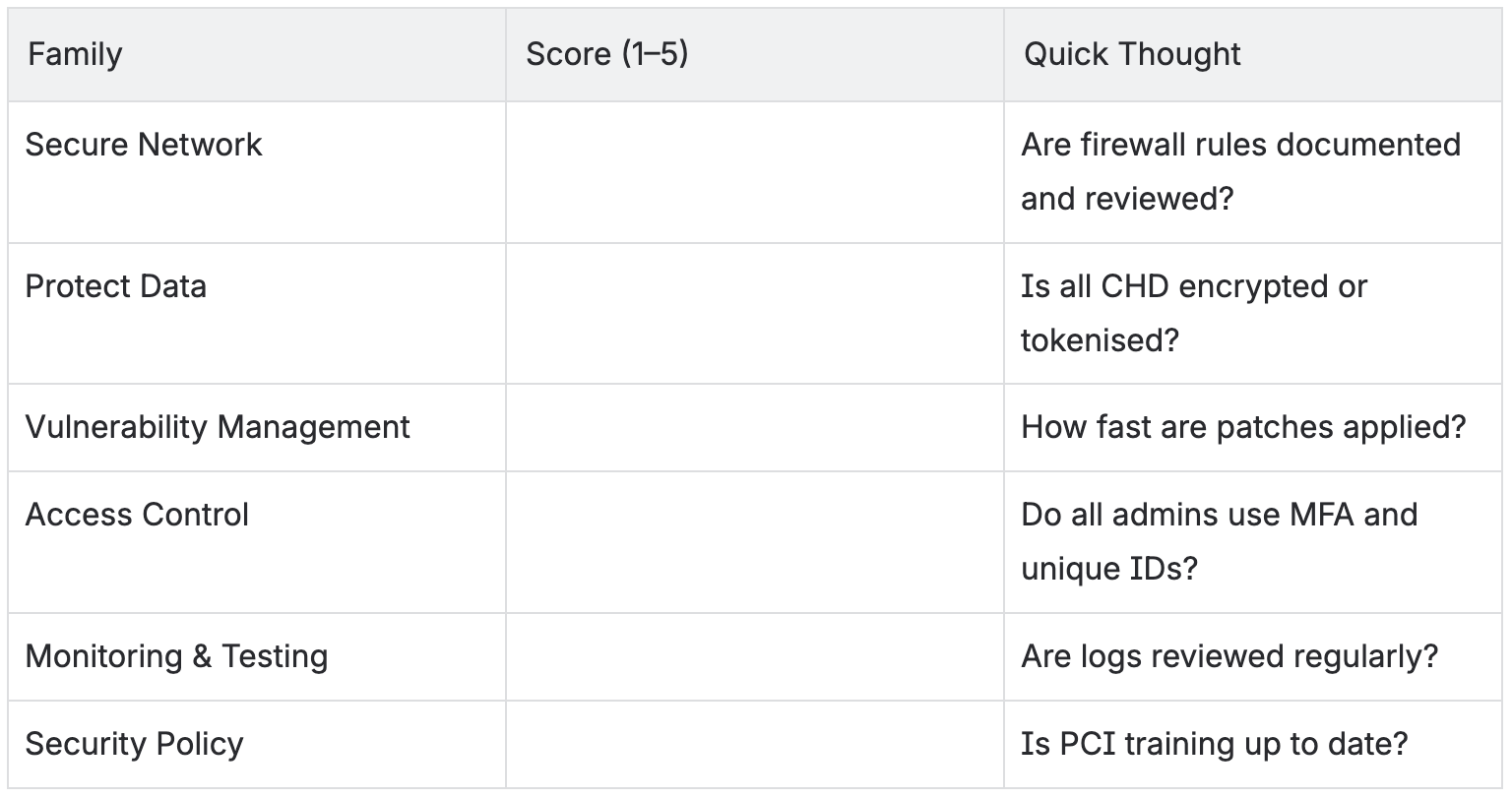
Even one low-scoring area is a risk worth discussing at your next planning session.
Mini-Review Quiz
What are the six control families in PCI DSS?
Give two examples of how architects can meet Requirement 1.
Why does PCI forbid shared accounts?
What’s the purpose of Requirement 6 for developers?
Which requirement ensures continuous monitoring and logging?
Why does PCI emphasise training and awareness in Requirement 12?
3.13 Summary: The Human Firewall
Technology enforces rules, but people enforce discipline.
PCI DSS isn’t just a checklist; it’s a way of thinking.
When architects design with segmentation, developers code with security in mind, testers validate data handling, and PMs track compliance tasks, PCI becomes a natural part of delivery.
“The most secure system isn’t the one with the strongest firewall, it’s the one where every person understands why the firewall exists.”